Monday, November 24, 2008 

IIS, SSL and Host-Headers

Update (3-Aug-2010): Multiple SSL domains on a single IP are now possible using Unified Communications UC SSL Certificates (Subject Alternative Name) - see my follow up article: Subject Alternative Names for SSL

Here's a knowledge base article I use to explain why an SSL site needs its own IP address: HTTP 1.1 host headers are not supported when you use SSL. Host headers allow a web server to host several websites on the same IP address. When a browser makes a request the domain name of the website is passed in the request host header. The server uses this to check against the list of websites it is serving. When this is combined with SSL the server needs to know which website's private certificate to establish the secure session - which is impossible as the session is established before any HTTP headers are sent.

Yet the article says: "Beginning in Windows Server 2003 Service Pack 1 (SP1) and IIS 6.0, Secure Sockets Layer (SSL) host headers are supported in IIS.", and points you to the article: Configuring SSL Host Headers (IIS 6.0). So we are all covered now? Well, no. The issue of SSL session being established before the host header still exists. IIS 6 only supports host headers where all the sites being served use the same wildcard SSL certificate; e.g. *.mydomain.com.au. The server doesn't need to know the host header when establishing the session, as there is only one certificate to choose from.

Why not include the the host header when we establish SSL? That is the plan of Server Name Indication - this does mean web browsers and servers all need to be updated to support the new standard. So it will be a while before SNI is well supported on the web.

Labels: ,

Sunday, September 21, 2008 

ASP.NET Defending Against Form Hackers

Something I've pondered previously: an ASP.NET page is populated with data retrieved from ViewState, is it possible to falsify the ViewState in the POST and trick the server into doing something that it shouldn't. In other words, a scenario where the original developer is just "trusting" information coming from ViewState.

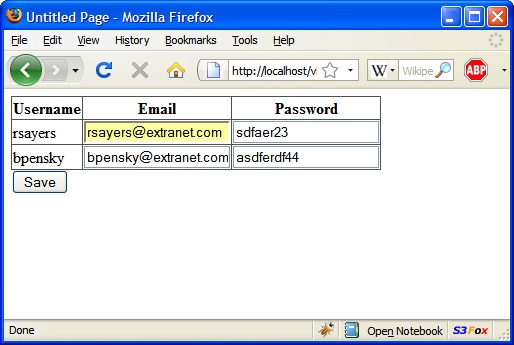
Here's an example - a company 'extranet' application which gives me an admin page to manage the username/passwords of my subordinate users. Let's guess the "trusting" developer behind this system implements the save by iterating over the GridView rows, and updating the database with the emails / passwords in the textboxes.

My superior's login is 'jvandelay' - of course I'm not able to see his record on my admin screen. After a postback the page is being populated using the data stored in ViewState. Can I craft up some viewstate that will add a row to the dataview, allowing me to update my superior's password?

Seaching around gets some good articles to answer my intial questions.

  • Can you falsify ViewState? By default: no - From ScottGu's Cool Viewstate Decoder: "Note that ViewState is MAC (message authentication check) encoded to prevent tampering by remote clients. As such, while you can decypher the viewstate settings using the above program, you can't actually change them and repost to the server.". There is a setting "EnableViewStateMac" on the @ Page directive to switch this off, so we can have a play around.
  • How would you build a falsified ViewState? Paul Wilson's ViewState: All You Wanted to Know give a good intro to the ViewState format, and the LosFormatter class used to serialize/deserialize ViewState

How do you craft up the 'malicious' ViewState? Let's start with deserializing the ViewState using LosFormatter. Paul Wilson's article provides a some code to traverse the object graph. See the results here. Now I can insert the objects into the object graph to fake an extra row in the ViewState. I've modified Paul Wilson's code to give to generate code to access the unwieldy positions in the graph, see the code here.

Here's the code to fake the ViewState, and serialize it back to a string we can put in a browser: here. The fake ViewState can be inserted into the __VIEWSTATE hidden field with the Web Developer extension in Firefox: right-click > Web Developer > Forms > Display Form Details. Click 'Save' and we get...

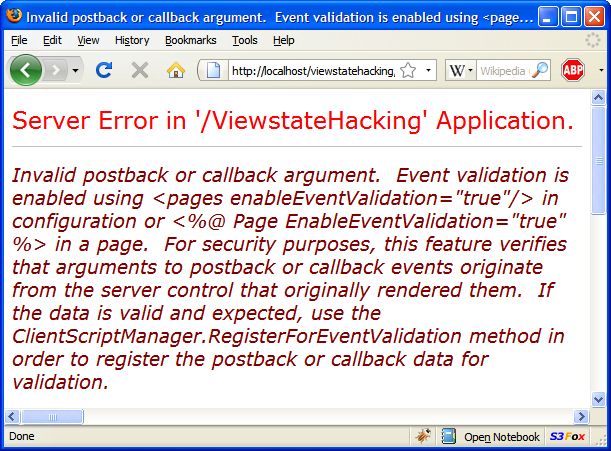
Foiled by EventValidation - somthing else I can switch off in the @ Page directive. More on Event Validation in K. Scott Allen's ASP.NET Event Validation and “Invalid Callback Or Postback Argument” : Part I. Interestingly the __EVENTVALIDATION value is derived from a hash of UniqueIDs XORed with a hash of the allowed values. Would I be able to fake this also? Maybe I'll follow that up in another blog article...

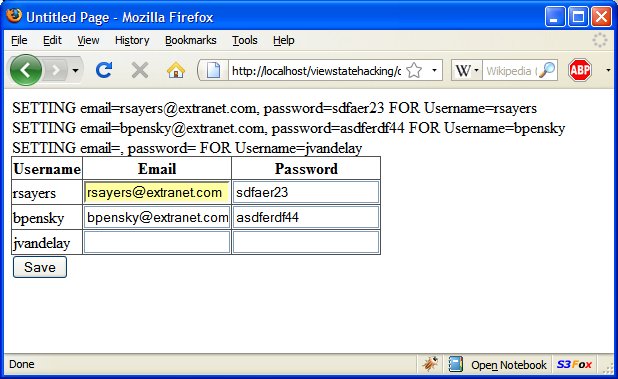
Anyway with EnableEventValidation off we get:

Success! And I certainly can fill in the email and password details for 'jvandelay' and see them saved! So it is did take quite a few things to come together to make this possible:

  • the original developer was a little to 'trusting' - the application could be testing if my login is attempting to update a superior's details
  • ViewState MAC encoding and Event validation needed to be turned off

Labels: ,

Tuesday, February 12, 2008 

How Does OpenID Work?

I've heard about OpenID on a podcast I listen to. Sounds interesting - an open source solution to have a 'single sign on' for many websites. Interested to see how this works - both as a user, and as a website author.

Here's a run through of an example authentication:

  1. User accesses an OpenID enabled website, site responds with a form requesting the user's OpenID identity.
  2. User enters their identity, e.g: russau.myopenid.com. Then submits the form to the website.
  3. Website server accesses http://russau.myopenid.com.
  4. Retrieves the location of the OpenID provider from the link tag:
    <link rel="openid.server" href="http://www.myopenid.com/server" />
  5. Website POSTs an 'associate' request to the provider. The two machines establish a secret using a Diffie-Hellman key exchange.
    openid.modeassociate
    openid.assoc_typeHMAC-SHA1
    openid.session_typeDH-SHA1
    openid.dh_consumer_public
    openid.dh_modulus
    openid.dh_genAg==
  6. Provider's response provides the website an 'assoc_handle' (and expiry) for future requests. The two servers now have established a shared secret, without passing it over the wire.
  7. assoc_handle{HMAC-SHA1}{47b0ec92}{5hMN8A==}
    assoc_typeHMAC-SHA1
    dh_server_public
    enc_mac_key
    expires_in1209600
    session_typeDH-SHA1
  8. The comsumer's response from step 2 contains a redirect to the provider, containing a number of parameters in the querystring. Note, the querystring contains the established 'assoc_handle', and a 'nonce' has been attached onto the 'return_to'.
    openid.modecheckid_setup
    openid.identityhttp://russau.myopenid.com/
    openid.return_tohttp://openidconsumer.test/cp/login.aspx?&nonce=vovudmLa
    openid.trust_roothttp://openidconsumer.test/cp
    openid.assoc_handle{HMAC-SHA1}{47b0ec92}{5hMN8A==}
    openid.sreg.requiredgender,postcode,timezone
    openid.sreg.optionalemail,country
    openid.sreg.policy_url
  9. The user is now on the provider website, and performs the step needed to authenticate, e.g. entering a password.
  10. The provider redirects the user back to the consumer website, along with parameters in the querystring. The consumer now has everything it needs to log in the user.
    noncevovudmLa
    openid.assoc_handle{HMAC-SHA1}{47b0ec92}{5hMN8A==}
    openid.identityhttp://russau.myopenid.com/
    openid.modeid_res
    openid.op_endpointhttp://www.myopenid.com/server
    openid.response_nonce2008-02-12T00:47:53ZyUUam3
    openid.return_tohttp://openidconsumer.test/cp/login.aspx?nonce=vovudmLa
    openid.sigEpvWdJtxacv2WtCaZLbud85M84k=
    openid.signedassoc_handle, identity, mode, op_endpoint, response_nonce, return_to, signed, sreg.country, sreg.email
    openid.sreg.countryAU
    openid.sreg.emailtestuser@webmail.com
    This querystring contains a couple of things to prevent an attacker from spoofing it. The 'assoc_handle' established in steps 5 and 6, the consumer uses to this look up the established secret. 'openid.sig' contains a digital signature of the parameter values listed in 'openid.signed', using the established secret. If an attacker were to change the 'openid.identity' in an attempt to login as someone else, the signature wouldn't match (without knowing the secret, the attacker cannot re-create the signature). Finally, the initial 'openid.return_to' in step 7 contained a nonce. If an attacker were to resubmit the querystring above unchanged (a replay attack), the consumer web site would know the nonce has already been used.

Further reading

Labels: ,

Tuesday, August 28, 2007 

Creating Your Own Dev SSL Cert for IIS

Ever wanted to create an SSL certificate for your dev box? There's no need for a well known CA like Verisign or Comodo on your dev box. Here are some guides to creating your own CA/signed certificates:

Labels: ,

Friday, April 06, 2007 

ShowMeDo: WASTE tutorial

My ShowMeDo tutorial Secure File Transfer With WASTE has just gone online. ShowMeDo is web site for tech tutorials in flash video - the majority are screencasts on varied programming topics. ShowMeDo has huge potential for learning new technologies, I think its going to get bigger and bigger...

Labels: ,

Monday, October 23, 2006 

SSL + Man-in-the-Middle

Spent some time reading up on SSL and how it defends against against the 'man-in-the-middle' attack. All the pieces to the puzzle were there in my previous post - I just needed a good reference on the protocol. The best references I found were:

Examining the protocol reveals how SSL defends against a man-in-the-middle attack.

ClientHello: SSL version number, cipher settings, randomly generated data
ServerHello: SSL version number, cipher settings, randomly generated data, server certificate. The server certificate contains the server's public key.
ClientKeyExchange: premaster secret for the session - derived from a hash of all the communcations to this point. This is sent encrypted with the server's public key. The server decrypts this, and ensures the hash matches its own hash of the communcations.
The client and server both create a session key to be used for the remainder of the session. The session key is derived from the premaster secret, client random data, and server random data.
ChangeCipherSpec: Finshed
HTTP GET (communcations now encrypted with the established session key)

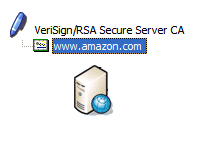
The server certifcate delivered in the ServerHello is signed by a trusted certifcate authority (CA). The client tests this signature against its own list of CA public keys. The server certifcate also contains the domain name of the server. This is used to confirm you have the certicate that has been authorised by an authority for the website located at amazon.com. If the certificate does not pass either criteria your browser will give you a warning.

If an attacker did sit in between your browser and a server and they passed along the certificate in the ServerHello - they wouldn't be able to decrypt the ClientKeyExchange. As this has been encrypted with the server's public key - and the attacker is only in posession of the public key. It is possible for the attacker to substitue their own certificate in this step. But the browser will issue a warning if the certificate isn't:

  • signed by a trusted authority,
  • and certificate's domain matches the site the client is connecting to.
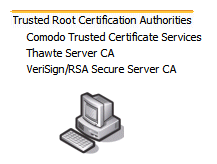
As you may have already guessed: To have your server certificate signed by a trusted CA's (like Verign, Thawte and Comodo) you have to provide evidence you own the domain! The other weakness is the list of trusted authorities you have installed in your browser. As mention by Steve Gibson in the Security Now podcast (episode 36) some corporate environments have inserted their own CA certificate in the client installations exactly so they can perform a man-in-the-attack to filter content at the proxy.
Now, there is an exception, though, which is the other reason I put this question in here today, because when you connect to a remote server you are accepting the credentials of the server, which has been signed by someone who signed their certificate, like we were talking about briefly before, about VeriSign, for example, signing GRC’s certificate. Some corporations do want to proxy and filter and literally basically decrypt and be able to read their employees’ encrypted traffic. So what they do is they run a proxy server in their corporate environment, which has a certificate. And every browser in the company has been told to trust that certificate. So essentially the encrypted traffic is decrypted at the corporate border.
It’s decrypted at the corporate border and then, essentially, filtered, proxied, checked for spyware, or even for naughty content. I mean, they could do anything they want to once they’ve got your connection decrypted. Then it is reencrypted using a certificate that every corporate browser has been deliberately installed with in order for the browser not to complain. So employees may believe they have encrypted and secure SSL connections, when in fact it is being decrypted in, you know, en route, essentially, you know, by their corporate firewall or IT staff or proxy server for whatever corporate reasons.

Which finally does explain how SSL defends against this attack!

Labels: ,